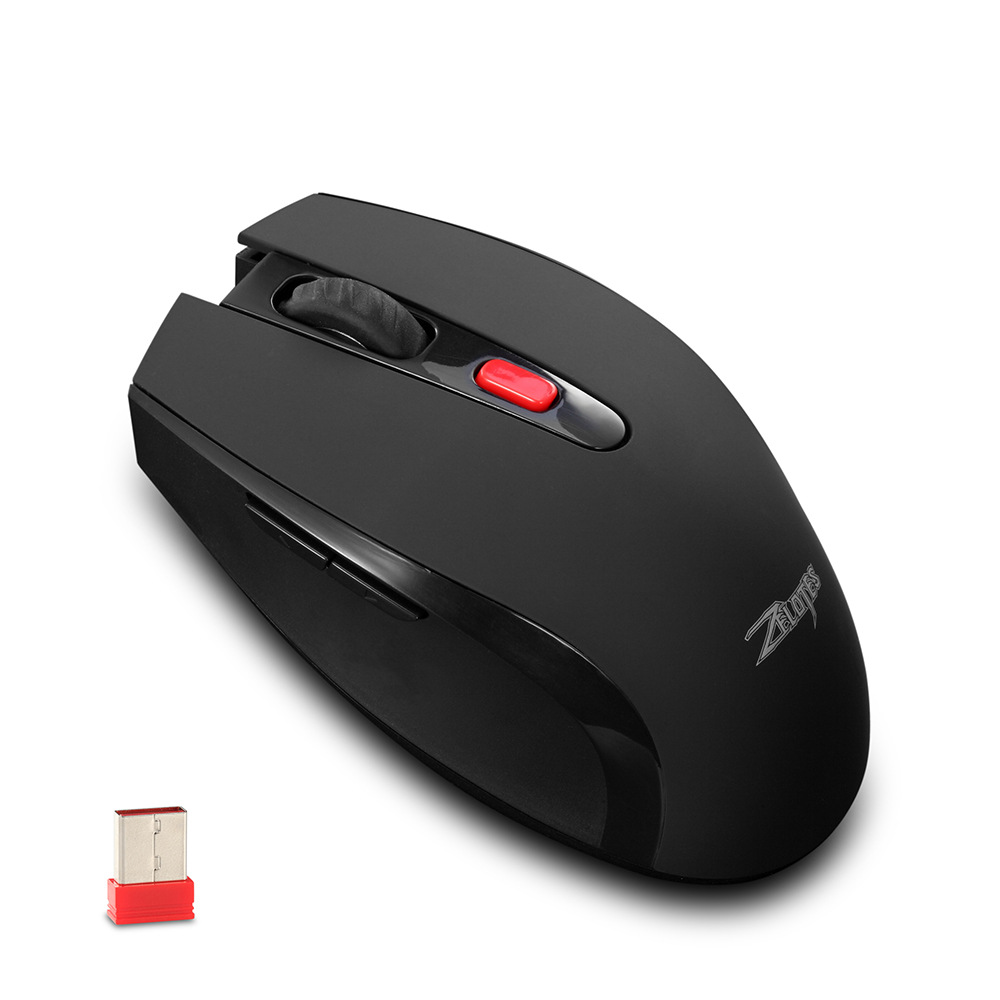

Full View
Similar items
Silent Wired Mouse, Female Photoelectric Ultra-thin Desktop Computer, Laptop, Home Gift Cartoon
NOK19.72
NOK26.36 -25% OFF

New L700 61Key Pudding Mechanical Keyboard Blue Axis 12 Lighting Modes Wired Games Spot Wholesale
NOK51.24
NOK70.16 -26% OFF
Imperial Leopard G905 Wired USB RGB Gaming E-sports Macro Programming Lightweight Hollow Luminous Mouse
NOK39.73
NOK61.58 -35% OFF
Skyscraper M6 Wireless 2.4G Silent Rabbit Cute Girl Office Laptop Mouse
NOK69.25
NOK101.65 -31% OFF
Fire Wing Star M706 Three-Mode Wireless Bluetooth Lightweight E-Sports Gaming Computer Office Rechargeable Wired Mouse
NOK96.11
NOK132.55 -27% OFF
Source Factory 2.4G Rechargeable Silent Computer Laptop Cross-Border Office Gaming Luminous Wireless Mouse
NOK30.66
NOK44.14 -30% OFF
Private mode 10 key RGB game USB computer 7 color hair photoelectric wired mouse
NOK53.34
NOK70.22 -24% OFF
Rechargeable Silent Ultra-Thin Dual-Mode Bluetooth For Computer Laptop Business Office Wireless Mouse
NOK32.43
NOK46.29 -29% OFF
Silent Wieless Chaging Fo Women Bluetooth Univesal Laptop Desktop Compute Gaming Dual Mode Office Mouse
NOK30.49
NOK42.73 -28% OFF
24000DPI Full Speed 12-Key Wireless Three-Mode Macro Definition Gaming Mouse One Piece Minimum Order Computer
NOK49.06
NOK65.70 -25% OFF
ZELOTES Master Office 2.4G Wireless Optical 2400DPI Low Power Mouse
NOK605.04NOK797.57
colour : black
Quantity :

Report
Include copyright infringementFree Standard Shipping. See details
Estimated between Mon, Aug 3 and Fri, Aug 7
You can return the product within 30 days of receipt. See details
Shop with confidence

Money Back Guarantee
Get the item you ordered or your money back. Learn more
About this item
Sourced from TTnumeral
Seller assumes all responsibility for this listing.Item number: 19659891
Item specifics
Features
Mirror, Matte, Skin-Like
Features
Mirror, Matte, Skin-Like
Features
Mirror, Matte, Skin-Like
Axis
Red Axis, Green Axis, Black Axis
Axis
Red Axis, Green Axis, Black Axis
Axis
Red Axis, Green Axis, Black Axis
Numeric Keypad
Yes, No
Numeric Keypad
Yes, No
Connection
Wireless, Wired, Bluetooth
Connection
Wireless, Wired, Bluetooth
Connection
Wireless, Wired, Bluetooth
Size
<100Mm, 100Mm-120Mm, 121Mm-130Mm
Size
<100Mm, 100Mm-120Mm, 121Mm-130Mm
Size
<100Mm, 100Mm-120Mm, 121Mm-130Mm
Item description from the seller
Wireless 6-button office mouse, using PAW3212 primary phase chip, with a DPI of up to 2400 DPI and a power consumption as low as 3-4 milliamperes. The conventional low-end wireless mouse only has 1600 DPI and a power consumption of 8-10 milliamperes or more. Poor quality wireless mice use chips such as KA8, V8, or 3065.
Component Function Description
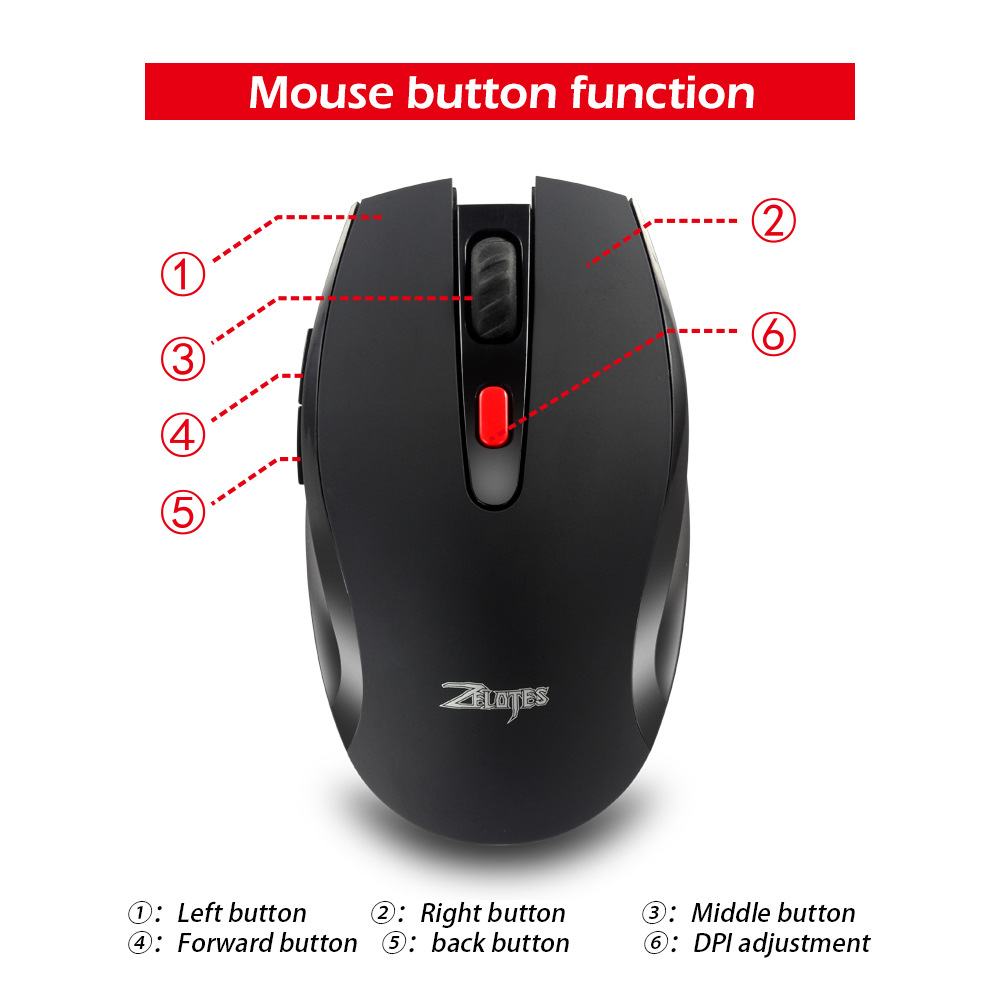
①: Left button ②: Right button ③: Middle button
④ : Forward key ⑤: Backward key ⑥: DPI adjustment
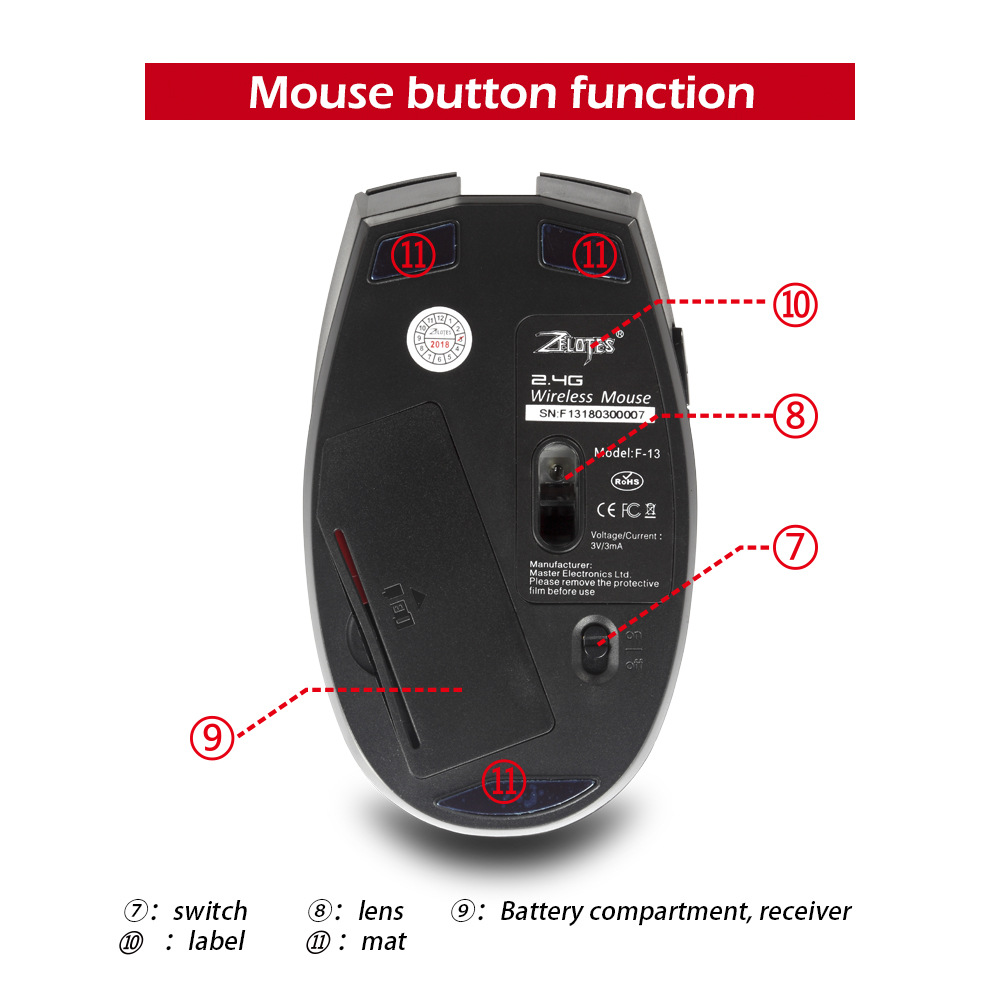
⑦ Switch ⑧: Lens ⑨: Battery compartment, receiver
⑩ : Label: Foot pad
Specification parameters
Number of keys: 6
Tracking system: optical
Frequency: 2405MHz-2476MHz
Effective distance: 10m
Working voltage/current: 3V/4mA
Key lifespan: 3 million times
Roller lifespan: 300000 revolutions
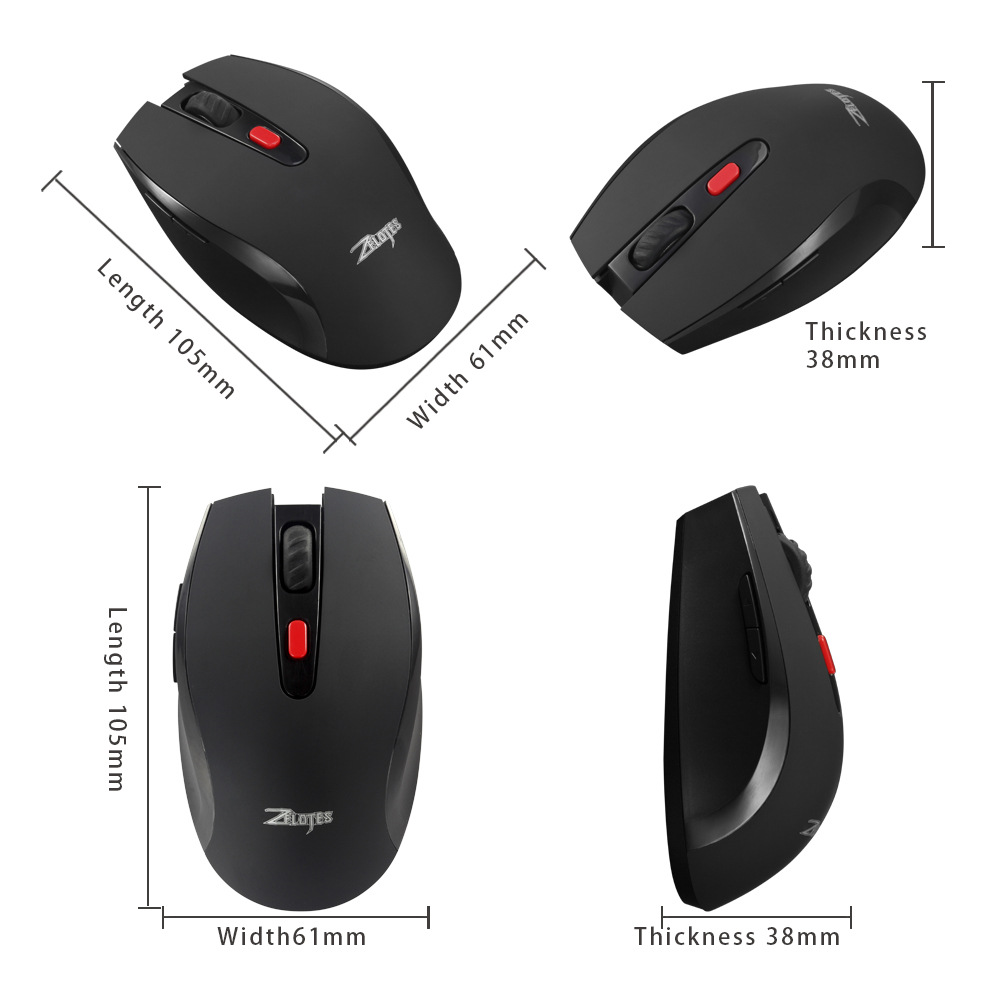
Product size: 105 * 61 * 38mm
Product weight: 705 grams
Resolution: 1000-1600-2400DPI
Return rate: 250Hz
What if the mouse doesn't respond?
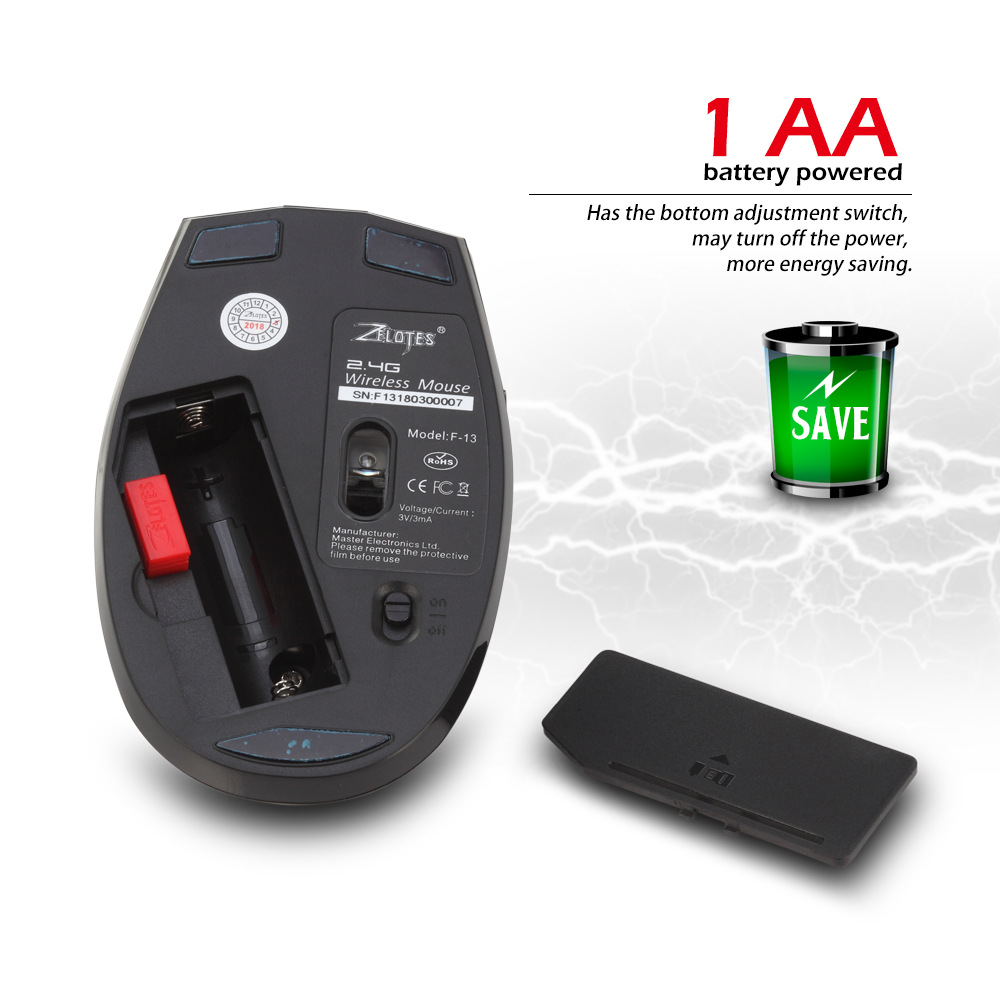
1. Please install it correctly according to the positive and negative pole markings inside the battery compartment.
2. Please replace the receiver with a new USB interface and try it out.
3. Ensure that the power switch at the bottom of the mouse is turned to the on position.
4. Try restarting the computer.
5. If the above operation is not successful, please email to: it@zelotes.cn Apply for technical assistance.
Specification
Button number: 6 buttons
Tracking System: optical
Frequency: 2405MHz-2476MHz
Effective distance: 10m
Working voltage/current: 3V/4mA
Button life: 3 million times
Roller life: 0.3 million turn
Product dimensions: 105 * 61 * 38mm
Product weight: 705g
Resolution: 1000-1600-2400DPI
Rate of return: 250Hz
1. According to the positive and negative sign, please install it in
The battery box correctly
2. Please try to replace the receiver with an USB interface
3. Make sure the power switch on the bottom of the mouse is
On position
4. Try
To restart the computer
5. If it is still unsuccessful, please email to email: it@zelotes.cn
For technical assistance